Overview
PMTiles is a single-file archive format for map tiles that enables serverless tile delivery directly from object storage — no tile server required. Like COG and GeoParquet, it uses HTTP Range Requests to let clients fetch only the bytes for the specific tiles they need, paying only for S3 storage and bandwidth rather than a running backend. The entire tile pyramid for a country fits in one portable file.
Key Concepts
1. Tile Archive Structure — Z/X/Y Tiles in One File
A .mvt file is a single tile. A .pmtiles file is an archive of millions of tiles — vector, raster, and terrain — stored in a single binary with an internal index. The index maps Z/X/Y coordinates to byte offsets, so clients can retrieve any tile without scanning the whole file. Internally deduplicated data and compression keep archive sizes practical even at global scale.
2. HTTP Range Request Serving — Same Mechanism as COG
PMTiles shares its delivery model with Cloud-Optimized GeoTIFF: the client reads the internal index with a small initial range request, then fetches only the bytes for the required tile. Each tile fetch is a standard HTTP 206 Partial Content response. No tile server, no routing logic — just S3 (or R2 or GCS) and a CORS policy.
3. Static Hosting Pattern — Serve from Object Storage Without a Tile Server
Hosting a tile set traditionally required GeoServer, MapServer, or a managed service like Mapbox. With PMTiles, the same tile set is a single file on S3 with public read access. MapLibre GL JS reads it directly via the pmtiles:// protocol prefix. Zero maintenance, infinite scalability via S3's backend, and the entire tile set is portable as a single artifact.
One of the biggest costs in traditional geospatial architecture is the managed tile server. Whether it's MapServer, GeoServer, or a hosted service like Mapbox, you typically pay for a backend to cut data into tiles.
PMTiles is a cloud-native single-file archive format for tile pyramids. It allows for completely serverless tiling using only a standard object store like S3.
1. How it Works: Range Requests 2.0
Like COGs or GeoParquet, PMTiles uses HTTP Range Requests.
- The client (your browser) reads an internal index (a tiny portion of the file).
- The index tells the client exactly where the tile for a specific zoom/x/y coordinate is located.
- The client fetches only those bytes.
- Cost: You pay for S3 storage and bandwidth, but $0 for a running server.
2. PMTiles vs. Vector Tiles (.mvt)
A .mvt file is a single tile. A .pmtiles file is an archive of millions
of tiles.
- It supports Vector Tiles, Raster Tiles, and even Terrain (RGB) Tiles.
- It is highly compressed and includes internally deduplicated data.
3. Why This Matters for Product Patterns
Choosing PMTiles means:
- Zero Maintenance: No servers to scale, patch, or restart.
- Infinite Scalability: Managed by the S3 backend.
- Portability: The entire map of a country can be a single file.
Practical Exercises
Package vector data into a PMTiles archive, inspect the internal tile inventory, and serve tiles serverlessly via a local HTTP server — observing HTTP 206 Partial Content responses in the Network Tab that prove the range-request delivery model.
What to Observe
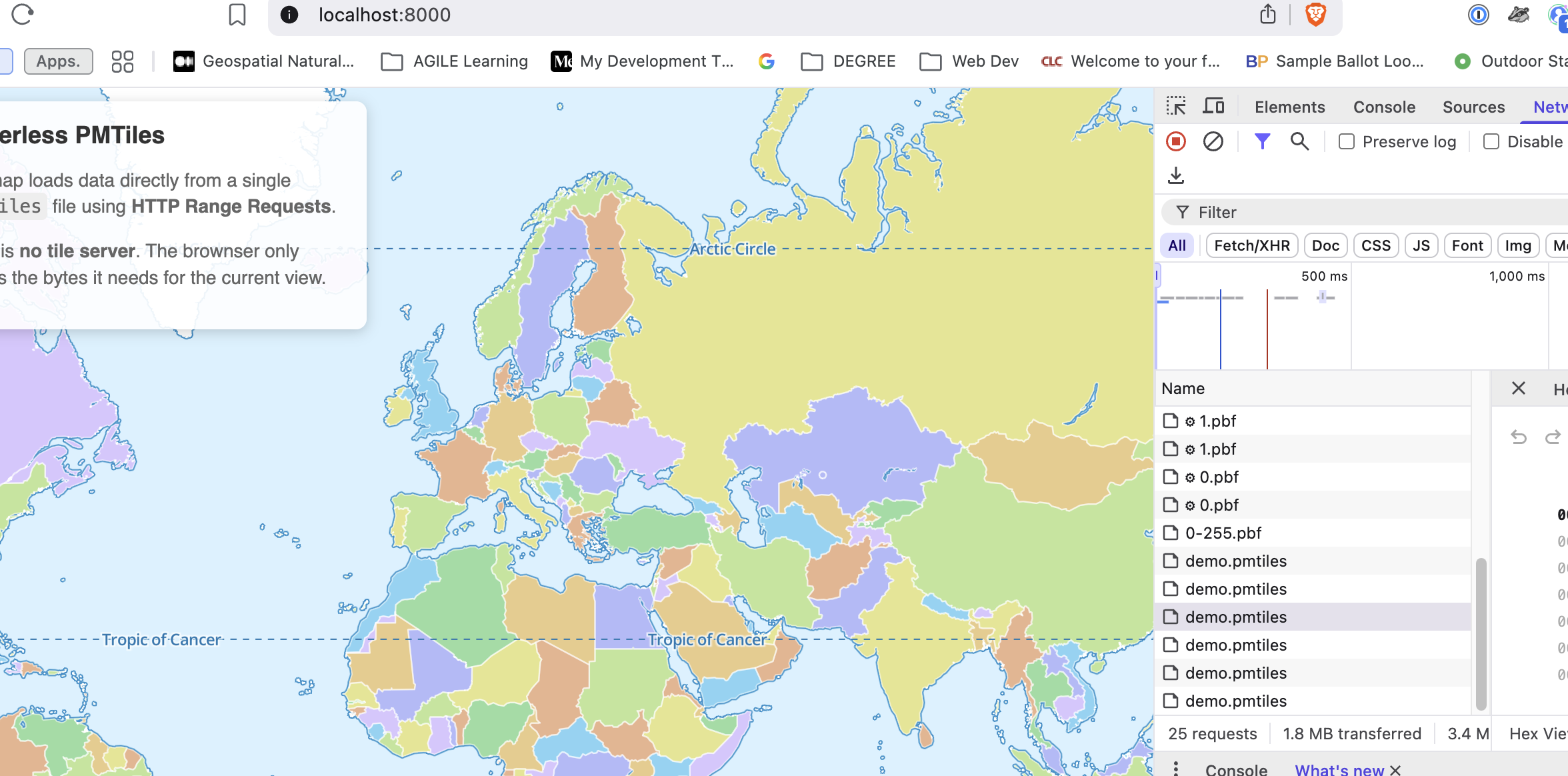
- One File, Many Requests: Look at your Network Tab. You will see
multiple hits for
demo.pmtiles. Notice that each one has a Status 206 (Partial Content). This is the browser fetching just the Zoom 0 or Zoom 1 bytes it needs. - No .pbf files: Unlike traditional vector tiles, there are no individual
.pbfrequests (e.g.,/tiles/0/0/0.pbf). Everything is binary-masked inside the single.pmtilesarchive. - Lazy Loading: If you zoom in or pan, you'll see new
206requests trigger. This is "Lazy Loading" at the byte level!