Live App & Exercise Access: Interactive tools in this track (such as the live custom Felt Extension) are not yet public. If you would like to test these applications, please reach out to the author.
Exercises are in
src/exercises/felt-integration/. Requires a Felt Enterprise trial — new accounts get 7 days free automatically at felt.com.
Overview
Felt is a modern collaborative mapping platform with a REST API and Python SDK that lets geospatial teams share, annotate, and explore spatial data without standing up a full GIS infrastructure. This module covers integrating cloud-native geospatial workflows with Felt — uploading layers programmatically, applying styles with the Felt Style Language (FSL), syncing live data feeds, and extending the map UI with custom AI-powered panels using the Felt JS embed API and Extensions.
Key Concepts
1. Felt Style Language (FSL)
FSL is a JSON-based declarative style specification. Every layer uploaded via the REST API can be styled with an FSL config that controls color, size, opacity, and categorical/numeric classification, similar to Esri's renderer JSON but simpler and browser-native.
FSL uses a version + type top-level structure with a config object for
classification settings and a paint object for visual properties. For
categorical point styles, categories and paint.color are parallel arrays
where the same index means the same category.
2. Felt Extensions
Extensions are TypeScript/JavaScript snippets that run inside Felt's split-view
editor, with direct access to the felt controller object. They ship with the
map so anyone who opens the map gets the extension automatically.
As of this writing, the felt controller exposes five subsystems: UI Extension Points, Action
Triggers, Custom Panels, Panel Elements, and Panel State Management. All methods
are flat on the felt global — there are no sub-namespaces like felt.ui or
felt.tools in the Extension context. Verify against the current Felt Extension docs as this API is actively evolving.
Extensions should never contain secrets (API keys). The correct architecture proxies sensitive calls through a Next.js API route — the extension posts to your server, the server calls the LLM with the stored key, and the server returns the result to the extension. This is the correct architecture for any extension that integrates external AI: the extension code is visible to anyone with map access.
The AI hazard extension (Exercise 5) demonstrates this pattern: the extension
calls POST /api/felt-analyze, and the route holds the ANTHROPIC_API_KEY
server-side. A Mermaid diagram of this flow: User clicks "Analyze Hazards" in
the Felt extension, the extension gets viewport center and data, posts to the
Next.js API proxy with { center, radius }, the proxy calls Anthropic Claude
with context and prompt, and returns the risk narrative markdown to the extension
for display in a sidebar panel.
Why Felt Instead of a Shared ArcGIS Online Link
The "shared link" pattern is ubiquitous in GIS teams: export your data, upload to AGOL, share a view-only URL, hope the recipient has a browser that renders it. Felt's developer platform offers three benefits:
- Programmatic publishing: A Python script can push data into Felt as part of a pipeline. No manual export, no AGOL portal login.
- Live layers: Felt can poll a URL and refresh a layer on a schedule. Your stakeholders see current data without ever refreshing or re-importing.
- Extensibility: Felt Extensions let you add custom UI panels, AI analysis, and drawing-mode interactions directly inside the map, without hosting a separate application.
Guided Exercises
Exercise 1: 01_rest_api.py — Publish Scout Data to Felt
Uses felt-python to create a map, upload the Scout GeoJSON fixture, and style
it with FSL. Output: a shareable Felt URL with colored category points.
Run with uv run python felt-integration/01_rest_api.py from src/exercises/.
Exercise 2: 02_esri_to_felt.py — Migrate an ArcGIS Feature Service
Pulls SF DPW street trees from a public ArcGIS REST endpoint, reprojects via GeoPandas, and publishes to Felt. This is the canonical SE migration demo.
Run with uv run python felt-integration/02_esri_to_felt.py.
If the SF DPW ArcGIS service is unavailable (it goes down periodically), the script automatically falls back to the same dataset on SF Open Data (Socrata).
SE talking point: this script replaces a manual "Export → ZIP → Upload" workflow and can be scheduled to keep Felt in sync with Esri enterprise data.
Exercise 3: 03_live_sync.py — Live Layer + Webhook
Registers an SF 311 GeoJSON feed as a live layer, then starts a local webhook receiver. Annotation events (draws, edits, deletes) print to the terminal.
Run with uv run python felt-integration/03_live_sync.py.
To test webhooks with real Felt events, run ngrok http 8765 to expose the
local server, then configure a webhook in the Felt dashboard pointing to the
generated ngrok URL.
Advanced Implementation & Exercises
Exercise 4: /felt-demo — Next.js Embed + JS SDK
A Next.js page that embeds a Felt map and listens for annotation creation events via the JS SDK. Select a drawing tool from the floating toolbar, draw on the map, and watch geometry appear as GeoJSON in the sidebar panel in real time.
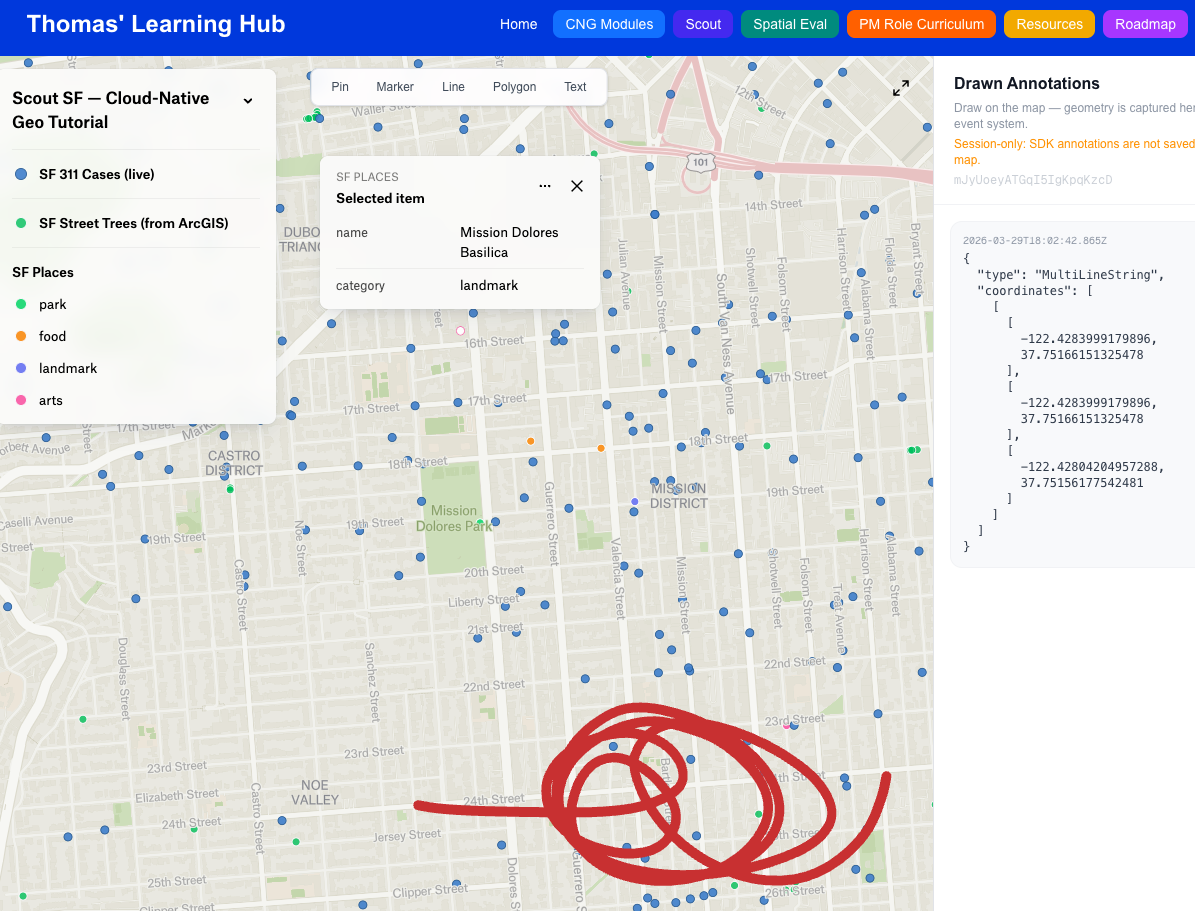
Run pnpm dev and open http://localhost:3000/felt-demo. On first load you'll
be prompted for your Felt map ID — paste the full map URL and the ID is extracted
automatically.
Note: Annotations drawn via the JS SDK are session-only and are not saved back to your Felt map. This is by design — the SDK's drawing tools are for ephemeral overlays (spatial queries, user selection). The learning objective is the
onElementCreateevent system and geometry capture.
Also provisions the /api/felt-analyze Claude proxy used by Exercise 5.
Exercise 5: 05_toxic_legacy_extension/ — AI Hazard Proximity Extension
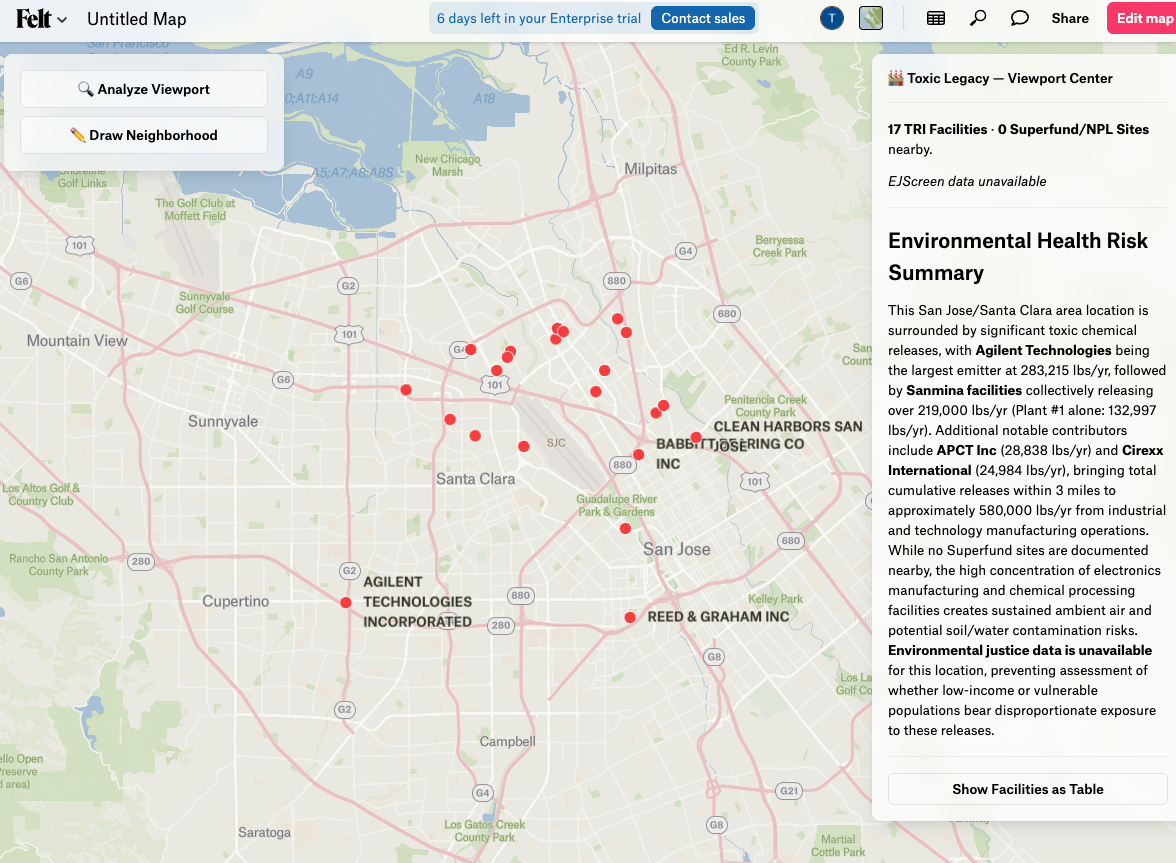
A full Felt Extension that surfaces EPA TRI facility data near any Bay Area location and generates a Claude-powered risk narrative with EJScreen environmental justice context.
Setup (run once before pasting the extension):
Generate the static Bay Area TRI dataset with uv run python felt-integration/05_toxic_legacy_extension/prepare_data.py (writes public/data/bay-area-tri.json), then start the local server with pnpm dev.
Required environment variables (.env.local):
Set ANTHROPIC_API_KEY — used by /api/felt-analyze unless the BYOK key is set.
The extension calls two local API routes:
GET /api/epa-facilities— serves TRI facilities from the static JSON, filtered by bounding boxPOST /api/felt-analyze— Claude proxy for narrative generation (Haiku, ~1–2s)
Both routes are public (no auth required) and explicitly CORS-enabled for Felt's
sandboxed iframe (Access-Control-Allow-Origin: null).
Coverage: Bay Area only (lat 37.0–38.5, lon -123.0 to -121.5). Analysis runs from the viewport center with a fixed radius (TRI: 3 mi, Superfund: 5 mi). Zoom to street level before analyzing — viewport center over open water returns zero results.
To use your own Anthropic key rather than the server's, set USER_API_KEY at
the top of the extension file before pasting. Use a restricted key — the
extension code is visible to anyone with map access.
See src/exercises/felt-integration/05_toxic_legacy_extension/README.md for
full step-by-step instructions and architecture notes.
What to Observe
After running all five exercises, open the Felt map and ask:
- Exercise 1: Does FSL categorical styling match what you'd expect from a legend?
- Exercise 2: How many steps did the Esri migration take vs. a manual workflow?
- Exercise 3: What does the webhook payload look like when you draw a polygon?
- Exercise 4: How much JS SDK code was needed to get annotation → GeoJSON flowing?
- Exercise 5: How does the Claude narrative compare to reading raw EPA ECHO data directly?
Felt's AI Extension Generator
Felt's own AI can generate extensions from natural language prompts. Try:
"Add a sidebar panel that shows a chart of layer feature counts when I click 'Analyze'"
The generated code will be syntactically correct and immediately runnable. Exercise 5 was built by hand to show every SDK surface explicitly — but in a real SE context, you'd use the AI generator to scaffold and then customize.
SE Framing: What You'd Build in Week 1 as a Felt Customer
| Day | What to build | Value delivered |
|---|---|---|
| 1 | 01_rest_api.py for your primary dataset | Stakeholders have a shareable map by EOD |
| 2 | 02_esri_to_felt.py scheduled daily | Felt stays in sync with Esri without manual exports |
| 3 | Live layer for real-time operational data | Field teams see current data without refreshing |
| 4 | Embed in your internal dashboard | Felt map lives alongside existing tools |
| 5 | Custom extension for your domain | Power users get AI-assisted spatial analysis |
This progression is the standard Felt onboarding arc for enterprise customers.